How to 3D Print a Pegboard: Hole Patterns, Panels, Hooks and Mounting
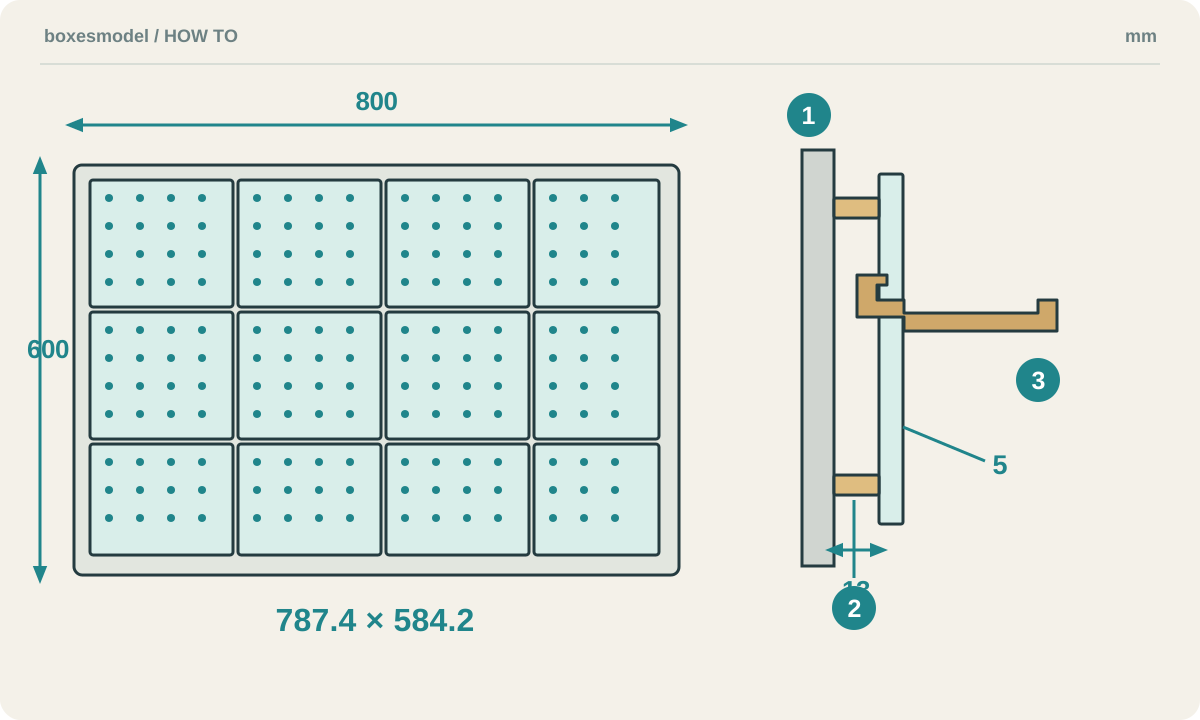
To 3D print a pegboard, choose a hole pattern and matching accessories, divide the wall area into printable panels, test a hole-and-hook pair, then mount the assembly. Learn the general design method before using the boxesmodel generator to plan an 800 × 600 mm wall area.
1. Measure the wall and plan the contents and mounting
Measure the usable rectangle, avoiding switches, sockets, door swings and working space above the desk. Arrange the objects on paper and record width, depth from the wall and weight. Allow space for your hand and for lifting accessories out of the holes. The printer only needs to fit each panel, not the whole wall.
Prepare a ruler, calipers, an FDM printer, a slicer, filament appropriate for the chosen design and fixings suitable for the wall. Decide on screw mounting or another method before setting the rear clearance. Keys joining printed panels align the pieces; they do not replace secure wall anchors.
2. Choose the hole system before the hooks
Round and slotted pegboards differ in more than appearance: pitch, hole width, board thickness and rear clearance all affect fit. If you already own hooks, measure their insertion profile, spacing and latch height before choosing a board. Otherwise choose panels and accessories from the same design system and test one pair first.
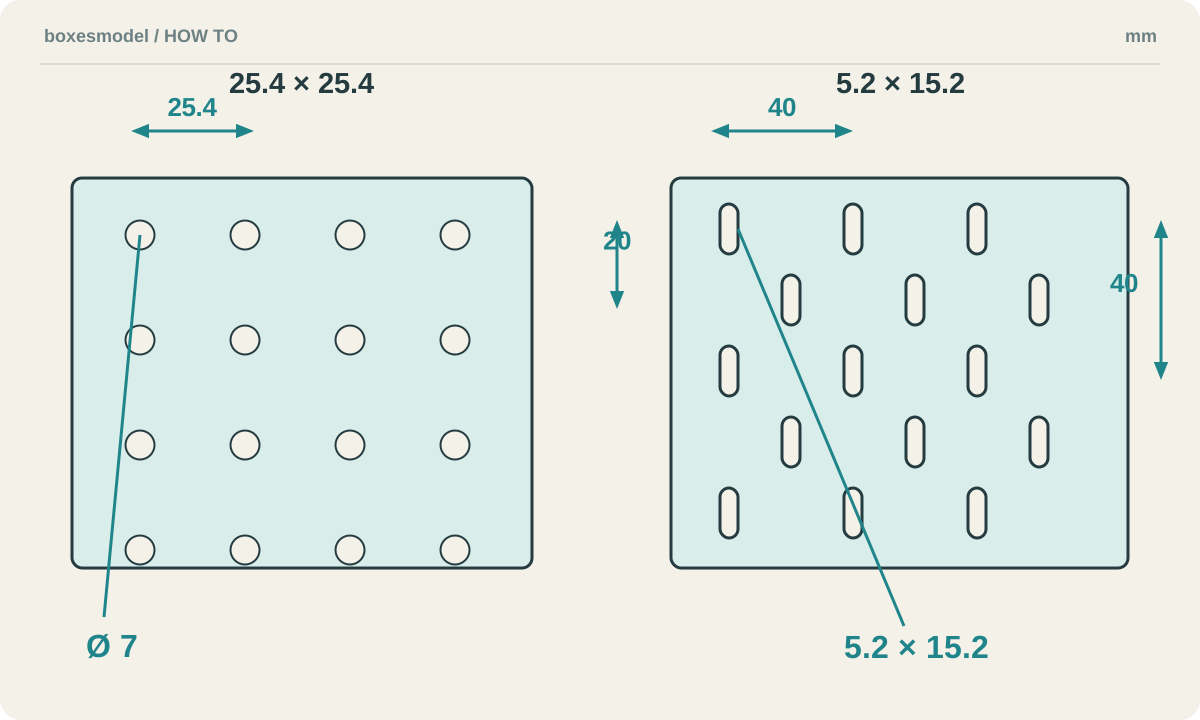
boxesmodel currently offers two fixed geometries: round holes with 7 mm diameter and 25.4 mm pitch; and SKÅDIS-compatible slots measuring 5.2 × 15.2 mm, with 40 mm vertical pitch in the same column and adjacent rows offset by 20 mm. Both panels are 5 mm thick. These are this tool’s design values, not universal retail specifications or IKEA approval.
3. Model and tile without breaking the hole pitch
In CAD, extrude a rectangle to the required thickness, cut one hole and pattern it using center-to-center spacing. Place panel divisions between neighboring holes, leaving solid material at edges, mounting holes and connectors. Randomly joining independently designed small boards can produce inconsistent pitch across the seams.
Usable bed size equals the nominal size minus margins on both sides. A 256 mm bed with 5 mm per edge gives 246 mm of usable span. Also check brims, clips, wipe areas and orientation. Label each panel specification and record its quantity and location before printing.
4. Slice and test the holes and hooks first
Print a small coupon with a few complete holes and one hook, preserving the final panel’s thickness and material around the holes. A flat-backed panel usually sits back-down on the bed. Orient hooks according to the model’s instructions, considering whether bending could separate layers at the narrow root. Inspect overhangs, support contacts and insertion surfaces, not just the front rendering.
Choose PETG or PLA as supported by the design; material names alone cannot establish load capacity. For this tool’s enabled 2 mm reinforcement around holes, follow its instruction to use at least 5 perimeters and inspect the sliced paths to ensure the region is filled continuously. A ring in the 3D preview does not by itself prove a solid printed ring.
After cooling, remove hole-edge burrs and test insertion, seating and removal. If a hook will not fit, measure the hole and hook and check elephant foot, support remnants and extrusion error. Do not simply scale up the whole board, which also changes the pitch. Print the full panels and remaining accessories after the test pair fits.
Material reference: Prusa’s PETG guide
5. Mount it empty, then check gradually
Dry-assemble panels on a flat surface and check orientation, seams and pitch. Locate mounting points according to the plan, taking wall material and concealed services into account, and use suitable screws and anchors. Maintain rear clearance, install accessories unloaded, then add light items gradually while checking for movement, bending or layer separation. Remove the load if deformation persists.
A software design load or a brief hanging test does not establish long-term safe capacity. Print orientation, layer bonding, temperature, duration, the wall and fixings all matter. IKEA likewise specifies fixings suitable for the home’s wall for its own pegboards; that mounting principle is useful, but the original product’s performance cannot be transferred to a printed version.
Mounting reference: IKEA SKÅDIS wall-fixing guidance
6. Plan panels and accessories with boxesmodel
Open the pegboard generator and choose “Living room wall 800×600”. Use a 256 × 256 mm bed with a 5 mm margin on each side and keep round holes. Rounding to the 25.4 mm pitch gives a board area of 787.4 × 584.2 mm. This example divides into 12 panels in three specifications, A, B and C, with quantities listed on the right.
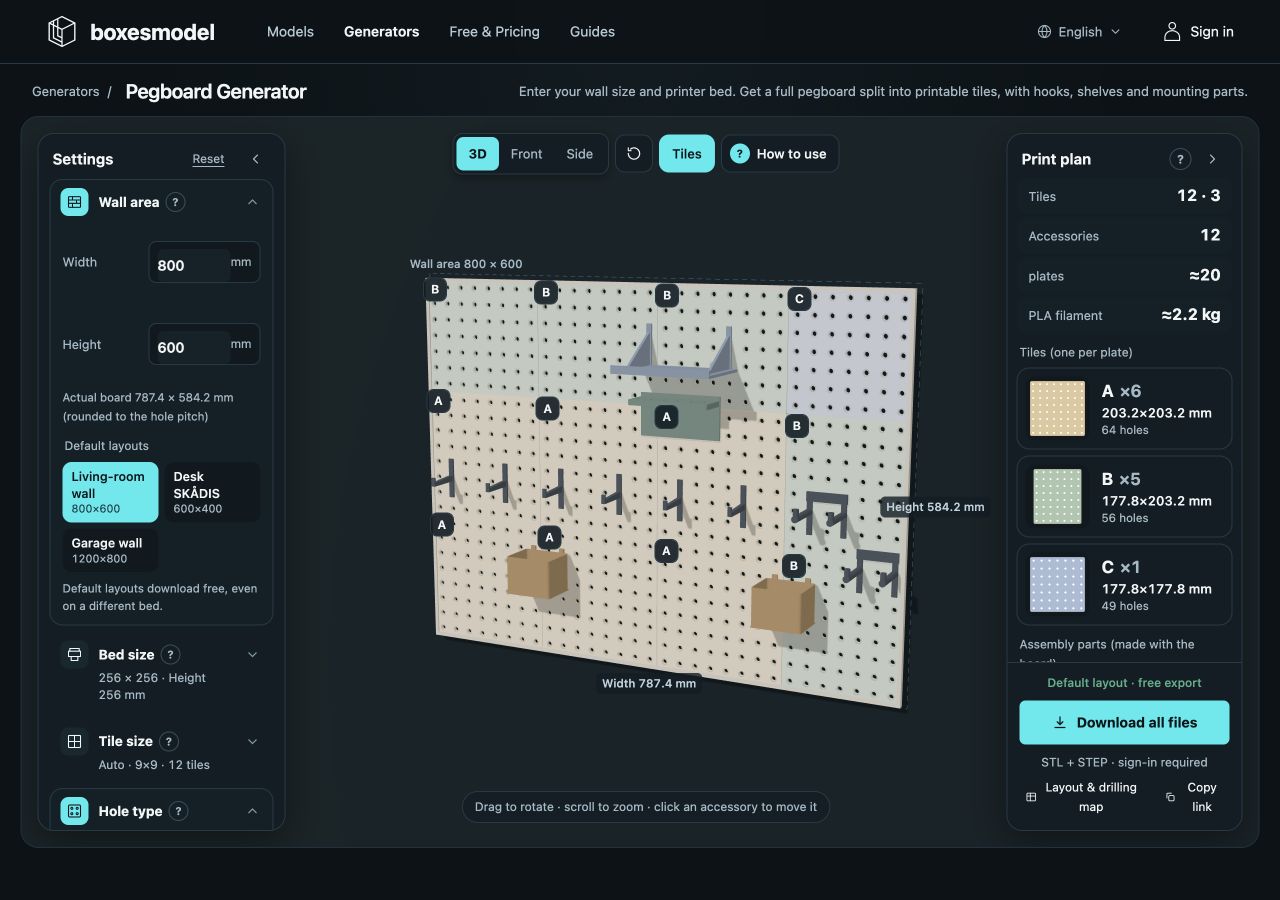
Choose accessory types, sizes, quantities and material under “Hooks & accessories”. Select an accessory in the preview to move it between holes: green indicates a valid position, red a conflict. If structural checks fail, follow the feedback on material, reinforcement, size or quantity. Passing the checks still requires the print and mounting tests described above.
Check rear clearance and fixings under “Mounting & assembly”, then inspect the panel and drilling layout. When printing the 1:1 drilling SVG, disable “fit to page” and verify its dimensions with a ruler before marking the wall. Use the download entry for STL and STEP and slice panels, accessories and assembly pieces separately; current download conditions are shown on the page.
Common questions and adjustments
Can a printed pegboard use store-bought hooks?
Possibly, if the hole shape, pitch, panel thickness and rear clearance all match. Brands and printing tolerances vary. Test your hook on a small printed coupon before producing the full board; a shared name does not prove compatibility.
Can I attach it with double-sided tape?
The model or a software option cannot establish that. Tape rating, wall finish, contact area, temperature and long-term peeling matter. Follow the tape and wall-surface guidance; if uncertain, use a verified mechanical fixing method and preserve the rear clearance needed by the hooks.
Hole geometries and panel counts describe the current tool. Images are design diagrams and real interface captures. No physical load test was performed; the mounting checks above are not a load certification.
Further reading
- STL vs STEP vs 3MF vs OBJ: 3D Printing File Formats Explained
- How to Measure Your Space and Size a 3D-Printed Storage Box
- Fit, Test Prints and Assembly Checks for 3D-Printed Boxes
- Tolerance and Clearance in 3D-Printed Storage Boxes
- How to Reduce Warping When Printing Lidded Boxes
- Slicer Settings for Printing Storage Boxes
- Choosing Filament for Storage Boxes: PLA, PETG, ABS and TPU
- 3D Print Cost Calculator: Filament, Electricity and Cost per Part
- How to 3D Print Custom Drawer Organizers: Measure, Model and Fit
- How to 3D Print Gridfinity Bins and Baseplates: Sizes, Dividers and Fit