How to 3D Print Gridfinity Bins and Baseplates: Sizes, Dividers and Fit
To build a Gridfinity organizer, plan bins and baseplates on a 42 mm grid, choose height and compartments, then print a matching sample before expanding. This guide explains dimensions, modeling and slicing, followed by a boxesmodel walkthrough for a 3 × 2, 6U bin and a 6 × 4 baseplate.
1. Understand bins, baseplates and the grid
Gridfinity is a modular storage system: baseplates locate bins using matching bottom geometry, so bins of different sizes can be rearranged. It suits screws, tools and small electronics that need changing layouts. If you simply need to fill an irregular drawer, free-sized bins may use the space more directly.
Prepare a ruler, calipers, an FDM printer, a slicer and editable models or a parametric tool using the same system. PLA is a practical first material for light indoor storage. Start by testing without magnets: magnets are optional aids to retention, not mandatory for every Gridfinity setup.
2. 42 mm is the grid; 7 mm is the height unit
Width and depth use a 42 mm grid; height is commonly expressed in U, where 1U = 7 mm. Grid pitch is not usable interior space: allow fit clearance, walls and internal features. boxesmodel uses cells × 42 − 0.5 mm for bin width and depth, so a 3 × 2 bin has an outer footprint of 125.5 × 83.5 mm within a 126 × 84 mm grid area.
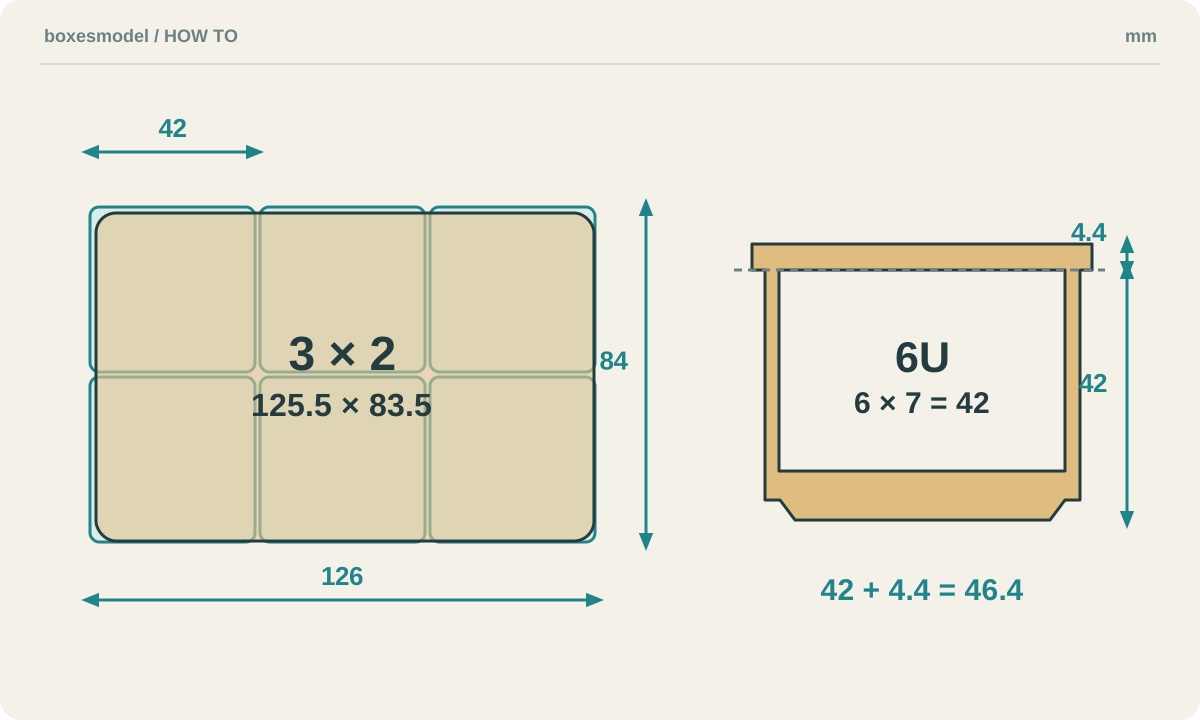
6U does not mean 42 mm of internal depth. The base, floor and access features consume space, and a stacking lip increases outer height. For a drawer, check the listed overall height against the closed cavity. With a baseplate, measure the assembled height after fitting rather than assuming that nominal part heights add directly.
3. Plan the baseplate footprint before the compartments
Measure the area, subtract the external clearance you need, then divide width and depth by 42 and round down to whole cells. For example, a 260 × 180 mm area can accommodate 6 × 4 cells with a 252 × 168 mm grid footprint. Leave the remainder as clearance or add a border; a border fills space without stretching the 42 mm grid.
Place objects on a paper grid to decide which cells each bin should occupy. Small screws may benefit from dividers; long tools need uninterrupted space. A label tab occupies part of the opening, while a scoop eases access to small items but changes the lower interior. Check the most awkward item before adding these features.
4. Preserve the interface and print a sample pair
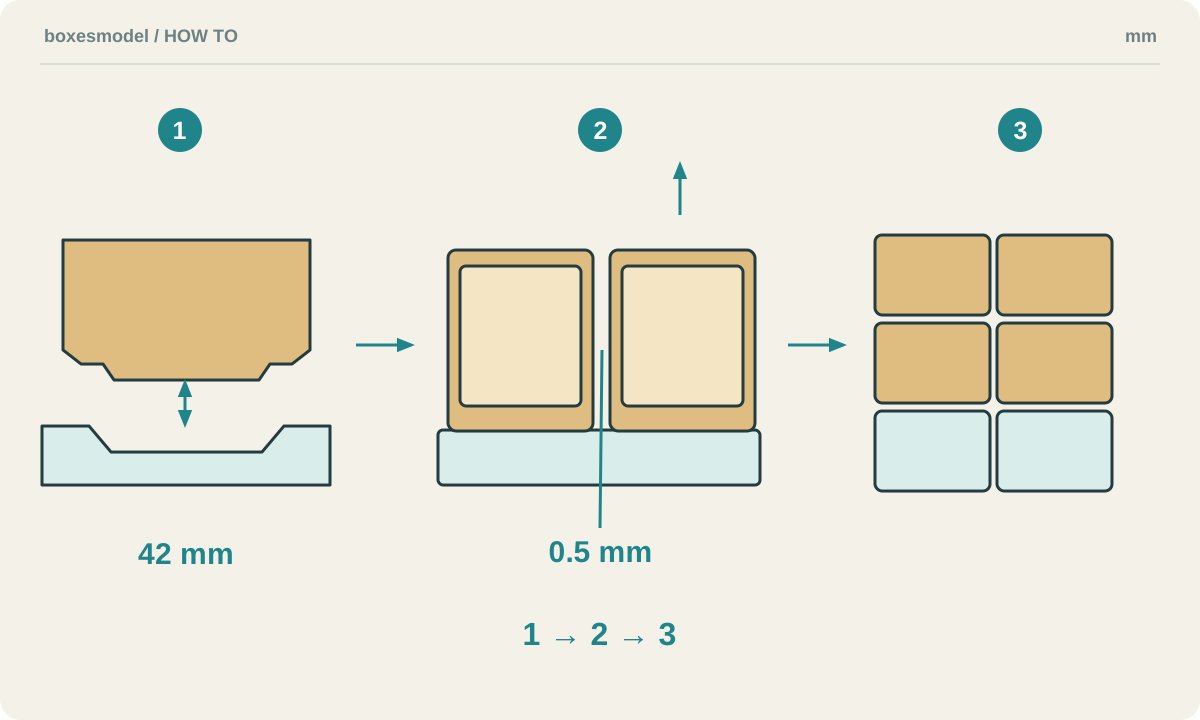
When modeling manually, reuse a documented Gridfinity base and baseplate interface, then build walls, dividers and access features above it. A simple “42 mm square” is not a substitute for the mating chamfers and radii. Avoid scaling the entire bin. When modifying an open-source design, read its license and parameter documentation first.
Dimension reference: Gridfinity community specification (draft)
Modeling reference: Gridfinity Rebuilt OpenSCAD
Bins usually print opening-up and baseplates flat. Start with the printer and filament profiles; with a 0.4 mm nozzle, 0.2 mm layers are a reasonable trial. Inspect base chamfers, the stacking lip, the underside of label tabs and bridges over magnet holes layer by layer. Check perimeters against wall thickness and line width; more infill alone does not guarantee a stronger interface.
Print a small bin and matching baseplate first. After cooling and removing first-layer burrs, check that the bin seats fully, stays level and can be removed by hand. Then test two neighboring bins and the stacking lip. For a tight fit, distinguish elephant foot from overall dimensional error. Retest after material, flow or first-layer changes before printing in bulk.
5. Make a 3 × 2, 6U bin with boxesmodel
Open the Gridfinity generator, choose bin mode and select “3×2 · 6U”. Keep 1.2 mm walls and the stacking lip, initially without dividers, label tab, scoop or magnet holes. The listed outer dimensions are 125.5 × 83.5 × 46.4 mm. This simple configuration is a useful starting point for understanding the dimensions.
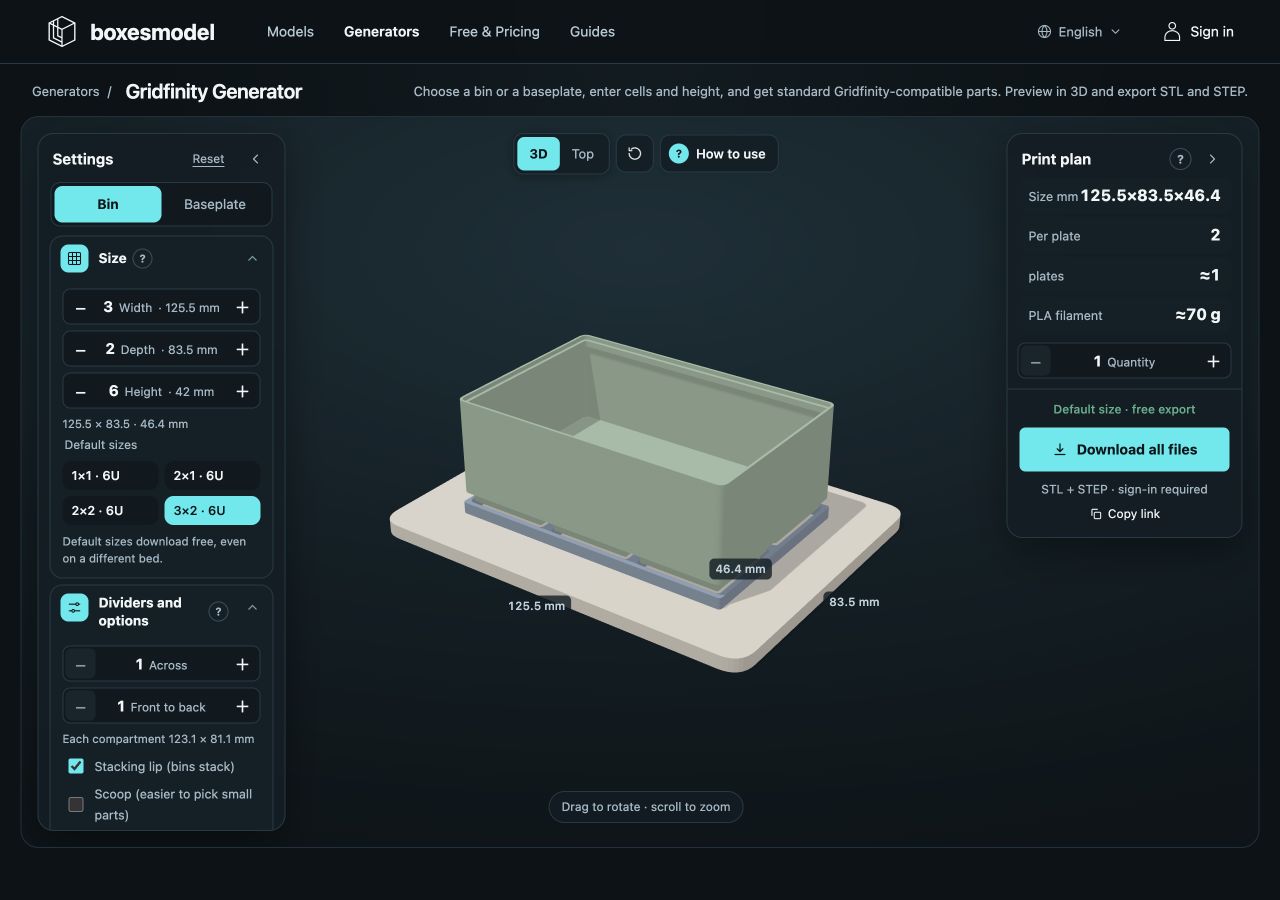
Add dividers across width or depth as needed and watch the displayed clear compartment dimensions. After adding a label tab or scoop, rotate the preview and check access. The optional holes use 6 × 2 mm magnet positions with M3 holes; measure the actual hardware and check polarity before deciding how to secure it. Nominal sizes do not eliminate trial fitting.
6. Generate the baseplate and check bed margins
Switch to baseplate mode and choose “6×4”. Its grid footprint is 252 × 168 mm. A 256 × 256 mm bed with a 5 mm margin on each side offers only 246 mm of usable width, so the 252 mm edge does not fit as one piece. The tool splits it into two 3 × 4 plates, each 126 × 168 mm, rather than merely comparing 252 with 256.
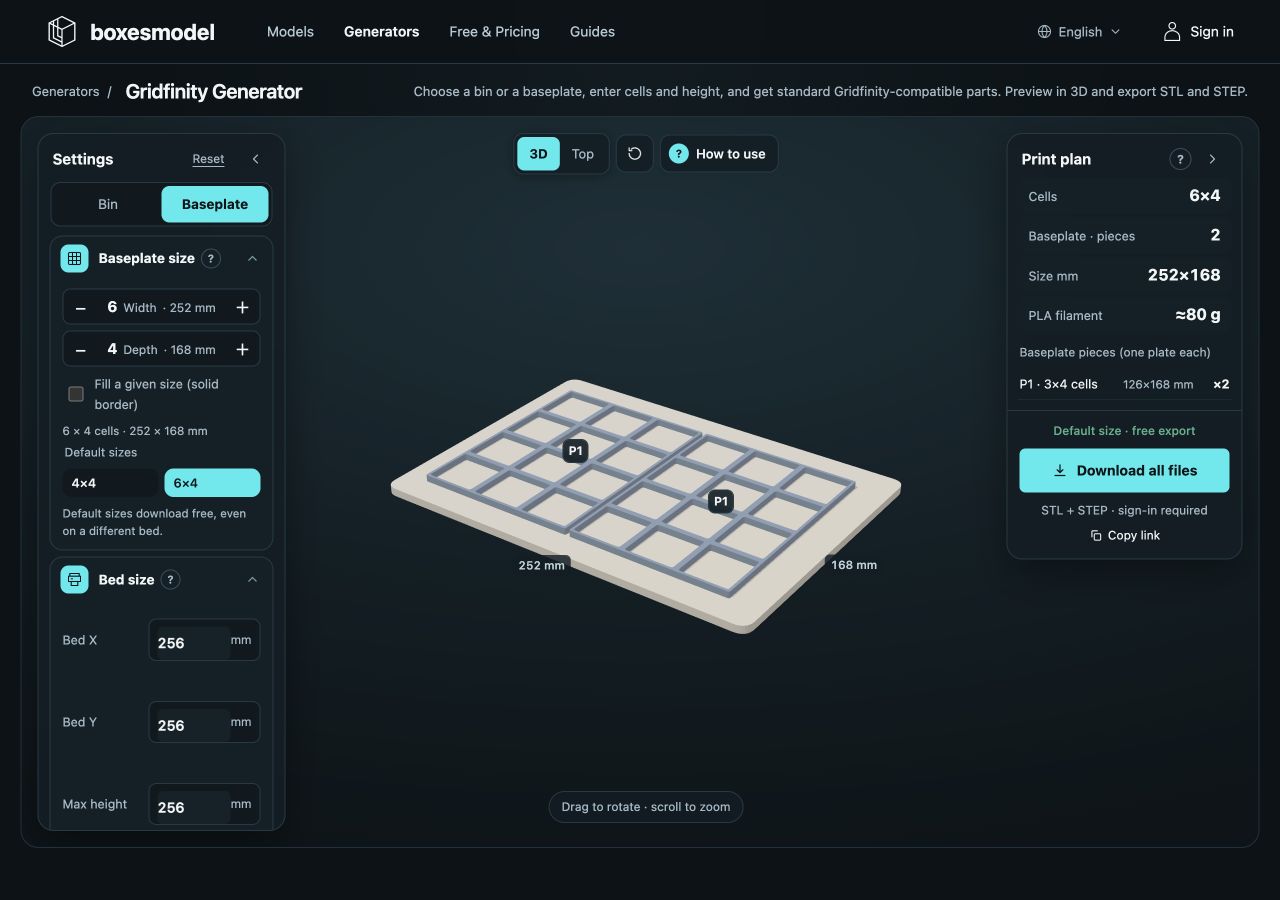
To fill a particular outline, enable “Fill a given size (border padding)” and enter target dimensions that already account for installation clearance. Recheck printable dimensions after padding. Once the preview and sample plan are ready, use the download entry, follow the page’s default/custom export conditions and verify every part in the slicer.
Common questions and adjustments
Why is a 1 × 1 bin not exactly 42 mm wide?
42 mm is the grid pitch. Bins need clearance between neighbors; this tool subtracts a total of 0.5 mm, giving a 1 × 1 bin an outer width and depth of 41.5 mm. Usable interior space is smaller still because of the walls.
Can I mix these with existing Gridfinity parts?
Compatibility is the design intent, but lip profiles, bases, magnet positions and print tolerances vary between implementations. Test a small bin with your existing plate, including adjacent and stacked arrangements. This guide does not include physical cross-brand validation; matching grid pitch alone is not a guarantee.
The examples follow current boxesmodel rules. Diagrams explain principles and tool images are actual captures. Software dimension checks are not evidence of slicing or physical fit tests; verify your printer, material and mating parts using the steps above.
Further reading
- STL vs STEP vs 3MF vs OBJ: 3D Printing File Formats Explained
- How to Measure Your Space and Size a 3D-Printed Storage Box
- Fit, Test Prints and Assembly Checks for 3D-Printed Boxes
- Tolerance and Clearance in 3D-Printed Storage Boxes
- How to Reduce Warping When Printing Lidded Boxes
- Slicer Settings for Printing Storage Boxes
- Choosing Filament for Storage Boxes: PLA, PETG, ABS and TPU
- 3D Print Cost Calculator: Filament, Electricity and Cost per Part
- How to 3D Print Custom Drawer Organizers: Measure, Model and Fit
- How to 3D Print a Pegboard: Hole Patterns, Panels, Hooks and Mounting